[]



By:
Matteo Tittarelli
tool guide
tool guide
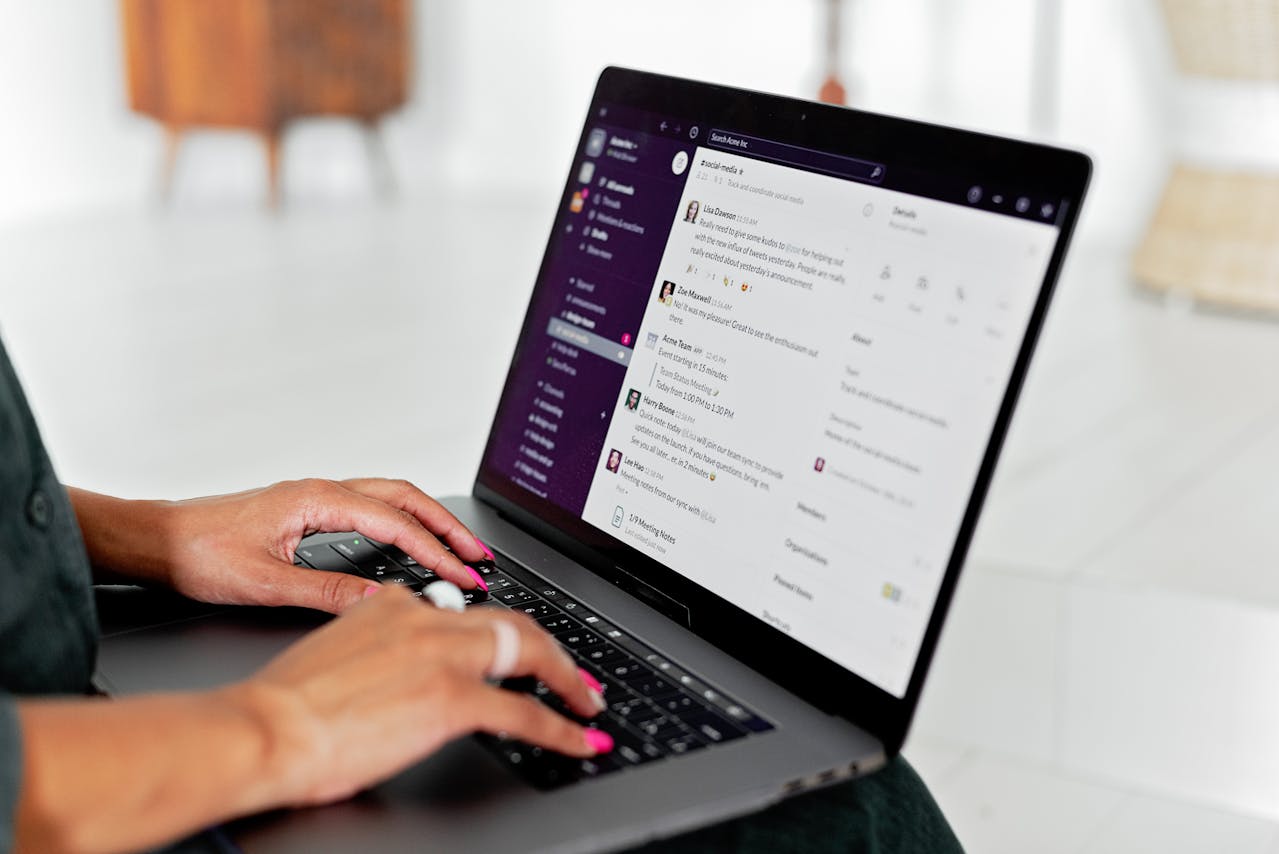
Shared-channel customer support platforms bring help directly into the messaging tools teams already use every day. Instead of forcing employees to navigate separate portals and ticketing systems, these platforms convert Slack conversations, Microsoft Teams threads, and email exchanges into trackable tickets with full automation capabilities. For organizations seeking Slack-native ticketing, this approach eliminates context-switching and keeps communication flowing naturally.
Key Takeaways
Shared-channel platforms convert Slack and Teams conversations into structured tickets without disrupting natural communication flow
Unthread leads the category as the only platform built natively for Slack and Teams from the ground up, achieving 40% automatic resolution at enterprise scale for internal support teams
Teams can choose between Slack-native platforms, shared inbox tools, enterprise omnichannel solutions, and budget-friendly options based on their primary communication channels
Key evaluation criteria include native integration depth, AI deflection rates, collaboration features, and accessibility for internal support operations
What Makes Shared-Channel Platforms Different
Traditional helpdesk systems treat messaging apps as notification channels, pushing alerts to Slack while requiring agents to work in a separate portal. Shared-channel platforms flip this model. They treat Slack or Teams as the primary workspace where tickets are created, managed, and resolved without ever leaving the conversation.
This distinction matters because context preservation drives faster resolution. When an IT request arrives in a dedicated #it-help channel, the responding agent sees the full thread, can loop in colleagues with @ mentions, and closes the ticket from the same interface. No portal logins, no copy-pasting context, no lost information between systems.
1) Unthread: Best Slack-Native Platform for Internal Support
Unthread stands out as the only platform architected specifically for Slack and Teams from inception. Unlike traditional helpdesks that bolt on messaging integrations, Unthread converts any Slack channel into a full help desk with structured ticketing, routing, and workflow automation.
What Sets Unthread Apart
Unthread delivers conversational ticketing that tracks every Slack thread as a ticket without manual creation. The platform’s purpose-built AI agent auto-resolves requests by referencing knowledge base articles, while self-learning documentation drafts new help articles from resolved ticket patterns.
Organizations using Unthread for IT, HR, and operations teams achieve 40% automatic resolution across departments.
Key Features
Conversational ticketing that tracks every Slack thread as a ticket without manual creation
Purpose-built AI agent that auto-resolves requests by referencing internal documentation
Self-learning documentation that drafts new help articles from resolved ticket patterns
Workflow automations built through natural language, visual drag-and-drop, or custom API integrations
Private ticketing flows for sensitive HR requests like payroll, benefits, and employee documents
Agents to triage requests automatically based on content and urgency
Primary Focus
Unthread focuses on internal support functions like IT, HR, and operations teams managing employee requests in Slack-first organizations. The platform achieves rapid setup in under one day compared to weeks for traditional ITSM platforms. The admin interface makes it easy to adjust workflows, routing rules, and automations as requirements change.
2) Front
Front provides a unified inbox that consolidates email, chat, SMS, and social messages into one collaborative workspace. Teams can comment internally on any conversation, share drafts before sending, and prevent duplicate replies through collision detection.
Key Features
Omnichannel inbox combining email, chat, SMS, and social in one view
Internal comments and @mentions on any conversation thread
Shared drafts for team review before responses
Automatic conversation routing based on rules and expertise
Primary Focus
Front operates as a separate platform rather than embedding directly into Slack, requiring teams to switch between applications.
3) Zendesk
Zendesk offers a comprehensive omnichannel platform with extensive integrations in its marketplace. The unified agent workspace handles email, chat, voice, social, and messaging channels with advanced customization through triggers, macros, and custom workflows.
Key Features
Unified agent workspace across all communication channels
Advanced ticket triage and automated workflows
Extensive marketplace with integrations
Enterprise-grade scalability for ticket volumes
Primary Focus
Zendesk operates primarily through its own portal, requiring agents to work outside their messaging environment.
4) Intercom
Intercom takes a messenger-first approach with its Fin AI chatbot resolving up to 50% of questions automatically. The platform combines in-app messaging, product tours, and proactive engagement capabilities.
Key Features
Fin AI chatbot with responses
In-app messaging and tours
Unified inbox for channels
AI resolution pricing model
Primary Focus
Intercom focuses primarily on customer-facing support rather than internal service delivery.
5) Freshdesk
Freshdesk provides a free tier for growing teams. The platform includes omnichannel ticketing, Freddy AI for categorization, and a built-in phone system for teams needing voice support.
Key Features
Free tier with core ticketing features
Freddy AI for categorization
Built-in phone system included
Fast deployment with learning curve
Primary Focus
Freshdesk offers Slack notifications rather than native Slack-based ticket management.
6) Hiver
Hiver works entirely within the Gmail interface, eliminating the need for a separate platform. Teams manage shared inboxes, assign conversations, and collaborate through shared labels without leaving their existing email workflow.
Key Features
Works directly inside Gmail
Shared labels and assignments
AI Summarizer for threads
Consolidates email and channels
Primary Focus
Hiver focuses on email-based collaboration rather than messaging-first environments.
7) HubSpot Service Hub
HubSpot Service Hub connects support operations directly to the HubSpot CRM, sharing customer data across sales, marketing, and service teams. The platform includes Breeze AI chatbots, customer portals, and satisfaction tracking in a unified database.
Key Features
Unified CRM database shared across departments
Breeze AI chatbots with routing
Customer portal for self-service
Free tier with ticketing
Primary Focus
HubSpot Service Hub benefits teams already invested in the HubSpot ecosystem.
8) Help Scout
Help Scout treats support interactions as conversations rather than tickets, emphasizing a human-centered approach with clean, email-like interfaces. The platform includes collision detection, a Beacon widget for live chat, and integrated customer history.
Key Features
Shared inbox with detection
Beacon widget for chat
Built-in customer history
Clean interface with curve
Primary Focus
The philosophy of treating support as conversations aligns with shared-channel principles, though the platform operates outside messaging environments.
9) Zoho Desk
Zoho Desk delivers enterprise-grade features at affordable pricing. The platform includes Zia AI for sentiment analysis, omnichannel ticketing, and workflow automation through Blueprint.
Key Features
Zia AI for analysis
Omnichannel ticket management
Blueprint workflow automation
Multi-brand help center support
Primary Focus
Zoho Desk integrates seamlessly with the broader Zoho ecosystem.
10) LiveAgent
LiveAgent combines a built-in call center with a fast live chat widget that LiveAgent says displays in 2.5 seconds. The platform currently lists 175+ features and 200+ integrations.
Key Features
Built-in call center with VoIP
Live chat loading quickly
130+ features included
200+ integrations available
Primary Focus
LiveAgent provides strong value for teams prioritizing voice and real-time chat.
11) Gorgias
Gorgias builds specifically for e-commerce with deep integrations into Shopify, BigCommerce, and Magento. The platform automates 60%+ of requests and manages Facebook, Instagram, and TikTok from a single dashboard.
Key Features
Deep Shopify integrations
Order history in view
Social media management
AI automation for inquiries
Primary Focus
Gorgias represents the vertical-specific approach to shared-channel support for e-commerce operations.
12) Pylon
Pylon represents the newer generation of B2B-focused shared-channel platforms, combining Slack, Teams, email, and live chat into a unified inbox. The platform includes AI agents and intelligent message routing.
Key Features
Unified inbox for platforms
AI agents for support
Intelligent routing based on tags
Purpose-built for workflows
Primary Focus
Pylon addresses the multi-platform challenge facing B2B teams.
Choosing the Right Platform
The right choice depends on where teams primarily communicate. Organizations living in Slack benefit most from Slack-native platforms like Unthread that preserve conversational context and eliminate portal switching.
For internal support functions like IT and HR, the ability to turn a dedicated Slack channel into a full help desk matters more than external features. Unthread handles this uniquely by keeping routine requests in-channel while routing sensitive matters like payroll questions to private flows.
Unthread’s setup takes under one day compared to weeks for traditional ITSM platforms. The admin interface makes it easy to adjust workflows, routing rules, and automations as requirements change, keeping overhead low for growing teams managing internal employee support operations.
Frequently Asked Questions
What is conversational ticketing?
Conversational ticketing treats messaging threads as tickets automatically, preserving the natural flow of communication. Traditional helpdesks require users to submit forms or navigate portals, creating friction and losing context. With conversational ticketing, a question asked in #it-help becomes a trackable ticket without any additional steps from the requester.
How does AI improve efficiency?
Purpose-built AI agents analyze incoming messages, reference knowledge base articles, and draft responses before human handoff. Unthread achieves 40% automatic resolution by deflecting common questions. AI also handles agents to triage, routing, and documentation updates as tickets resolve.
Can platforms handle multiple channels?
Most platforms consolidate Slack, Teams, email, and live chat into unified inboxes. The key difference is whether the platform treats messaging as the primary interface or as one of many channels feeding a separate portal.
What security considerations matter?
Enterprise deployments require SOC2 Type II compliance, SSO integration, and options for dedicated hosting. Platforms handling sensitive internal requests like HR inquiries need private ticketing flows and audit trails. Some organizations prefer bring-your-own-LLM options for AI features to maintain data control.
How do self-learning bases work?
Self-learning knowledge bases like Unthread’s automatically detect repeat questions from ticket patterns and draft new help articles for review. This eliminates the manual documentation burden while ensuring knowledge stays current as common issues evolve.
Ready to implement? Start with GTM clarity.
Get a free 30-min call to align your stack with your GTM strategy.










Explore more articles












Extract key points